Stream TV - Pair Voice Remote
Here's how to place the Voice Remote for your 2nd-generation Stream TV into pairing mode.
The steps below apply to the 2nd-generation Stream TV which can be identified by the Find My Remote button. If you have the original Stream TV model, refer to Stream TV - Pair Voice Remote. 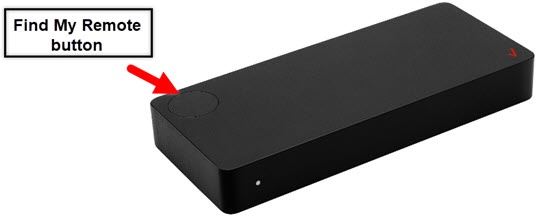
- If the 'Pairing your remote' screen doesn't display, place the Stream TV in Bluetooth® discovery mode with the existing voice remote or the remote control app.
- Press and hold thePlay/Pause buttonand the0 buttonsimultaneously for 6 seconds.
- Release the buttons to enter pairing mode.A blue LED will blink above the Play/Pause button on the remote.
- Allow up to a minute for the process to complete.
For additional info, see this Stream TV support page.