Samsung Galaxy Watch3 - Reply to an Email Message
Here's how to reply to email from your Galaxy Watch3.
- The email feature is not available on watches while set up as a standalone device.
- Email accounts are managed through the Microsoft Outlook app on the paired phone, not from the watch.
- From your Android™ smartphone or Apple® iPhone®, ensure an email account has been added to the Microsoft Outlook app.
- To send or receive emails, you'll need to:
- Ensure Bluetooth® is enabled on both the watch and smartphone.
- Keep the watch near your smartphone throughout the entire process.
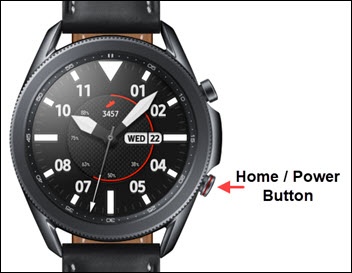
- From the watch screen, press theHome buttonto open the apps screen.
- Tap theMicrosoft Outlook app.
- Swipe up or down to view messages in the inbox then tap the desired email to view the message.
- Tap theMenu icon(to the right) then tap 'Reply' or 'Reply all'.
- Swipe up or down to view quick reply option then tap desired reply to send.Quick replies can't be edited. Use the paired phone to reply to an email with a customizable message.