Wireless Home Phone (LVP2) Activate / Set Up Device
Wireless Home Phone (LVP2)
Activate / Set Up DeviceActivate your Wireless Home Phone (LVP2) to get started. This ensures you can make calls using a standard home phone connected to the base.
Before you begin
Electrical equipment can cause interference with Wireless Home Phone (LVP2). Avoid placing it near other electrical equipment such as a refrigerator, television or microwave oven.
Your Wireless Home Phone (LVP2) comes with the SIM card pre-installed. If it was removed, re-insert the SIM card.
Customers transferring in their home number can't make or receive calls on the Wireless Home Phone (LVP2) until the transfer process is completed. The transfer process can take 2-10 business days. Check the status of your transfer by visiting www.verizon.com/switch-to-verizon/check-status/ or by calling (877) 567-4899.
Steps
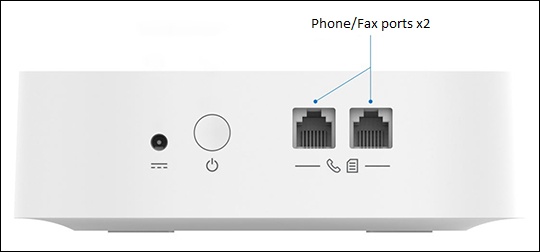
- Connect the power adapter to the device then plug it into an AC power outlet.
- Make sure the home phone isn't connected to a phone jack in the wall.
- Connect the home phone to the device.
- Press and hold thePower buttonuntil the device begins to power on.The LCD display and LED indicator below the display will light up when turned on.
- Confirm the correct phone number displays.If not already activated, the activation process can take up to 5 minutes.
- Once the Home screen displays (signal indicator, time, etc.), place a call to start using the service.Ensure the screen shows at least two signal strength indicator bars. If no signal bars appear, move the Wireless Home Phone (LVP2) to get a stronger signal.10-digit dialing is recommended, especially when dialing long distance. Dialing only 7 digits may not work as expected.