Session status messages
Session Status

Due to inactivity, your session will end in approximately 2 minutes. Extend your session by clicking OK below.

Due to inactivity, your session has expired. Please sign in again to continue.

Push To Talk Plus - Send a Location Attachment

2026-10-15 04:19:08.126

Push To Talk Plus - Send a Location Attachment

Here's how to share your Push To Talk Plus location.
  • Ensure the PTT+ app has been updated to the most recent version for Android™ or iOS.
  • Pictures, video, location, voice messages or PDF files are sent by attachment.
  • Usage of the PTT+ app requires GPS.

Send a Location From Ready

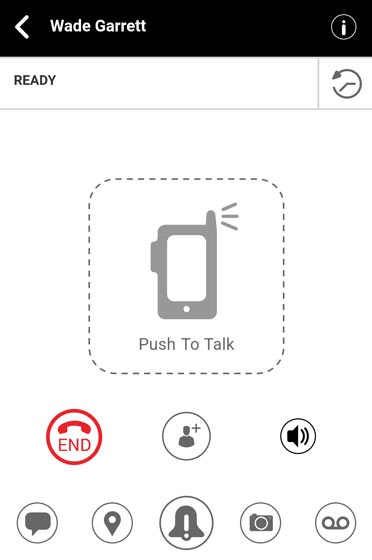
  1. From the Ready screen, tap the
    Location icon
    Share location icon.
    Alternatively, tap the
    History icon
    Recent icon then tap the
    Location icon
    Share location icon.
    Push to Talk Plus call ready scree
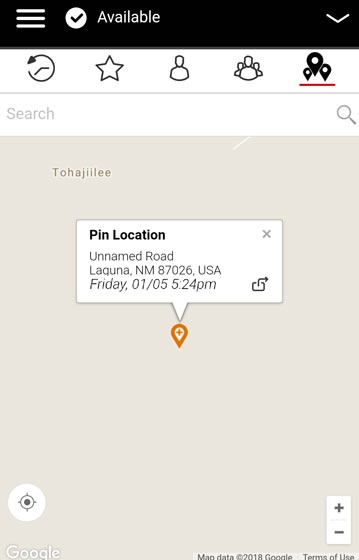
  2. From the My Location screen, tap the
    Map pin icon
    Location pin icon.
    Alternatively, use the search box, zoom, and swipe to pinpoint an alternate location to share.
  3. Tap the
    Share icon
    Location share icon to send your location.

Send from the Location Tab

  1. Tap the
    Location Tab
    Location icon.
  2. From the My Location screen, use the search box, zoom and swipe to pinpoint an alternate location to share.
    Location Tab
  3. Tap the
    Share icon
    Location share icon then select from one of the following:
    • Forward to Contact
    • Forward to Quick Group
    • Forward to Group.