Verizon Jetpack 4G LTE Mobile Hotspot MiFi 4620L Restore Settings to Factory Defaults
Verizon Jetpack 4G LTE Mobile Hotspot MiFi 4620L
Restore Settings to Factory DefaultsIf your Verizon Jetpack® 4G LTE Mobile Hotspot MiFi® 4620L powers off, crashes/resets, freezes or runs slow, view this info.
Before you begin
Restore Settings to Factory Defaults only if absolutely necessary as it removes all modified settings including Network Name (SSID), Wi-Fi / Admin Password, etc. and restores the default settings viewable on the external LED of the device.
After restoring to factory defaults, ensure Power Management Settings are set to the preferred options.
Preferred Method
- Ensure the device is powered on.
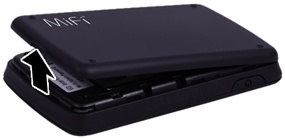
- Remove the battery cover.Utilizing the provided slot, carefully lift then detach the cover.
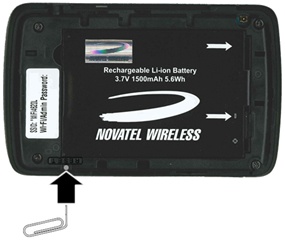
- Utilizing a paperclip (or similar tool), press and hold the reset button until MiFi® Resetting appears on the display, then release.Hold the button until the LED blinks one full blink and then a brief blink (5 seconds or less).
- Replace the battery cover.
Alternate Method
- Access the Admin Web Interface.
- From the System tab, clickSystem Status.
- From the System tab, clickReset to Factory Defaults.
- ClickOK.