Samsung Galaxy Z Flip8 Insert / Remove SIM Card
Samsung Galaxy Z Flip8
Insert / Remove SIM CardSwitching to a new device, traveling or troubleshooting a connectivity issue? Learn how to quickly and easily insert or remove the SIM card for your Galaxy Z Flip8.
Before you begin
Don't try to insert the SIM card while the device is powered on. Doing so may harm the SIM card and / or the device.
Steps
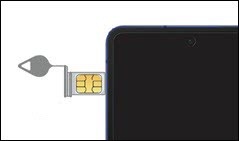
- From the top left of the device, remove the card tray.Use the insertion / removal tool or a paperclip to unlock the tray by inserting it into the provided slot then remove the tray.
- Do one of the following:
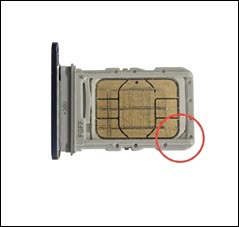
- To insert the SIM card, ensure the gold contacts are facing up, then press in on the card to lock it into place. When seated correctly, the notches align on the bottom left of the SIM tray.
- To remove the SIM card, remove the tray then lift the SIM card from the tray.