One Talk T74LTE Smart Desk Phone Call Recording via USB Storage
One Talk T74LTE Smart Desk Phone
Call Recording via USB StorageYour One Talk T74LTE smart desk phone can record audio during active two-party or conference calls using the phone's internal memory or a USB flash drive.
Before you begin
Up to 12 hours of audio can be recorded in one file.
Calls can only be recorded if a USB flash drive is connected.
Recording can only begin during an active call.
If on a conference call, all conference participants are recorded. If one of the participants holds the call, only that participant is recorded. If a conference call is placed on hold, the recording is paused; recording resumes when the conference call is resumed.
Steps
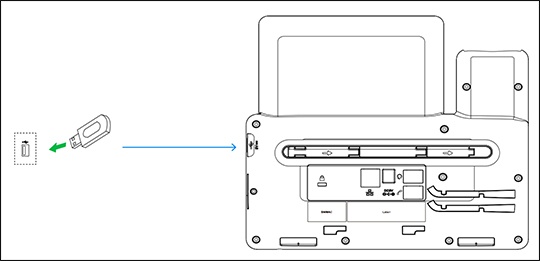
- Connect a USB flash drive to the USB port.The USB port is located on the right side of the phone near the screen.
- To record call audio:
- While on a call, selectStart REC.
- To stop recording, selectStop REC.
- To play recorded calls on the desk phone:Recorded calls are saved in .WAV format and can also be played back by plugging the USB drive into a computer.
- From the idle screen, navigate: .
- Select the desired recording; the audio file begins playing automatically.
- Recordings can be deleted by selecting theDeleteoption.
- To view the used and remaining space on your USB drive, navigate: .