Wi-Fi Extender (CE1000A) Set Up Device / Pair
Wi-Fi Extender (CE1000A)
Set Up Device / PairExpand your home network coverage. Check out this guide to configure and connect your Wi-Fi Extender CE1000A.
Wireless (WPS) Pairing
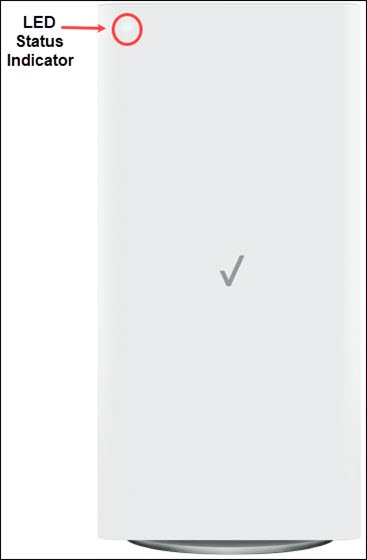
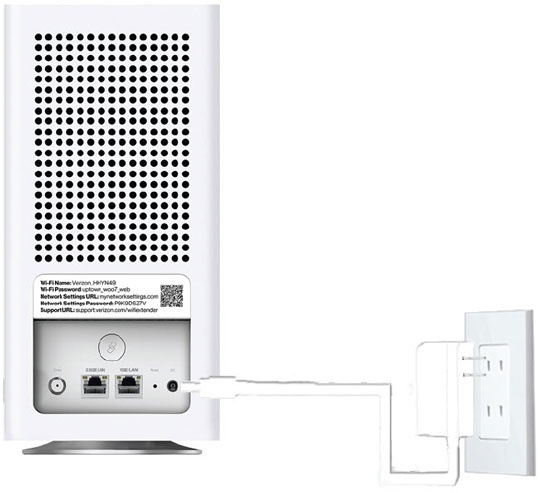
- Plug the Wi-Fi Extender into a power outlet next to the Verizon Internet Gateway and wait for a solid white light.
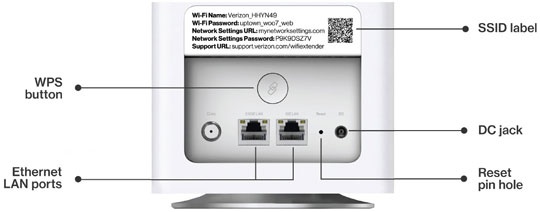
- Press and hold theWPS buttonon the Wi-Fi Extender CE1000A for 3 seconds, then the pair button on the Verizon Internet Gateway (within 2 minutes).Both devices blink blue while pairing.If there is an error during the pairing process, the Status LED slowly flashes red for two minutes after the error occurs.Once a solid white or blinking yellow light is observed on the Wi-Fi Extender CE1000A, it’s paired.
- Unplug the Wi-Fi Extender from the power outlet, move it between the internet gateway and the weak Wi-Fi coverage area, then plug into a power outlet.If a fast-blinking yellow light is observed, move the extender further away from the internet gateway.If a slow-blinking yellow light is observed, move the extender closer to the internet gateway.
- Once the LED indicator turns solid white, your setup is complete.
Wired (Ethernet) Pairing
- Connect the Wi-Fi Extender to the router via the Ethernet cable.
- Plug the Wi-Fi Extender into a power outlet and wait for a solid white light.Both devices blink blue while pairing.If there is an error during the pairing process, the Status LED slowly flashes red for 2 minutes after the error happens.Once a solid white or blinking yellow light is observed on the Wi-Fi Extender CE1000A, it’s paired. This may take up to 10 minutes.
- Unplug the Wi-Fi Extender from the power outlet, move it between the internet gateway and the weak Wi-Fi coverage area, then plug into a power outlet.If a fast-blinking yellow light is observed, move the extender further away from the internet gateway.If a slow-blinking yellow light is observed, move the extender closer to the internet gateway.
- Once the LED indicator turns solid white, your setup is complete.