Google Pixel 8 / 8 Pro Check for Physical Damage
Google Pixel 8 / 8 Pro
Check for Physical DamageThese examples help you identify physical or liquid damage that could affect the performance of your Pixel 8 / 8 Pro.
Before you begin
Prepaid service customers
: Visit a Verizon store to order warranty replacements. Orders for prepaid warranty issues can't be processed via Customer Service.Standard service customers
: If you need to replace your device under warranty and the device has unreasonable wear and tear or any of the following, you could be assessed a damaged device fee.Liquid or Corrosion Evidence
To identify if your device has water damage, check for:
- corrosion, discoloration or oxidation on the charging port or SIM tray.
- moisture under the display screen.
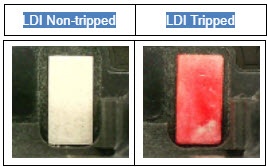
- Liquid Detection Indicator (LDI) / Liquid Contact Indicator (LCI) is activated.
Damaged Ports
- View the following ports using a bright light and magnifier if possible:
- USB / Charging: Examples of charging port damage include but are not limited to:
- the port is loose or wiggles.
- the port is bent.
- corrosion.
- SIM tray
Display Issues or Damaged Buttons / Camera
- Examples of screen damage / button issues include but are not limited to:
- Display: Examples of display issues include but are not limited to solid line(s) present across the screen, bleeding display, punctures, cracks or excessive scratches.
- Separation: Examples of separation include but are not limited to lens or housing separating from device frame.
- Missing physical buttons: Volume, Power button missing or damaged.
- Warping: Device or screen won't lay flat.
- Pixel Deformities: Caused by physical impact to screen or device.
- Camera: Missing or cracked camera lens.
Hardware Modifications
- A hardware modification is any physical change made to the device not performed by the manufacturer or an authorized agent of the manufacturer.
- Most alterations of this type are cosmetic but involve opening the device case in a way that voids the manufacturer's original warranty and is considered physical damage.
- Hardware modifications include, but are not limited to:
- bezels or cases that involve opening the case and removing the original housing.
- non-removable back case detached.
- device screens replaced.
- aftermarket decorations affixed permanently to the device.
Replacement Options
If damage is found, several replacement options may be available.