Verizon Internet Gateway (WNC-CR200A) View Network Name and Password
Verizon Internet Gateway (WNC-CR200A)
View Network Name and PasswordFollow these steps to find the Wi-Fi network name (SSID) and password for your Internet Gateway (WNC-CR200A) so you can share your internet connection with other devices.
Before you begin
Wi-Fi Name (SSID)
: The name that identifies the wireless network.Wi-Fi Password
: The password that's needed to connect to the Wi-Fi network.View via Admin Page
- Access the router admin page.
- From the 'Wi-Fi' section (upper-right), view the 'Wi-Fi name' or 'Wi-Fi password'.If necessary, click the 'Show password' icon.For more detailed info, and to change the Wi-Fi name or password, click theWi-Filink.
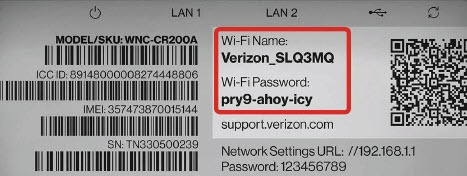
View via Device
- Place the router face down on a flat surface.
- From the bottom of the router, view the default 'W-Fi Name' or 'Wi-Fi Password' on the label.