KYOCERA DuraForce PRO 3 Insert or Remove SD / Memory Card
KYOCERA DuraForce PRO 3
Insert or Remove SD / Memory CardIf your DuraForce PRO 3 is low on storage, use an SD card for extra space. Follow these steps to insert or remove it without losing data.
Steps
- Ensure the phone is powered off.
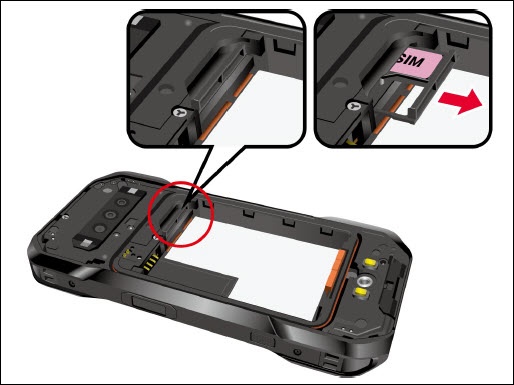
- Locate the SIM / microSD card slot inside the battery compartment then pull the card tray out of the slot.
- Do one of the following:
- Insert the SD / Memory Card
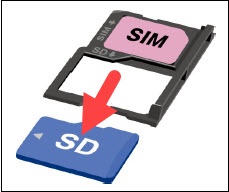
- Put the tray onto a flat surface and place an SD / memory card into the tray. Ensure the gold contacts are facing down as shown. Insert the SD / memory card into the tray with gold contacts facing down.
- Remove the SD / Memory Card
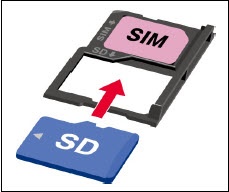
- To remove the SD / memory card, gently push up on the card from underneath the tray.
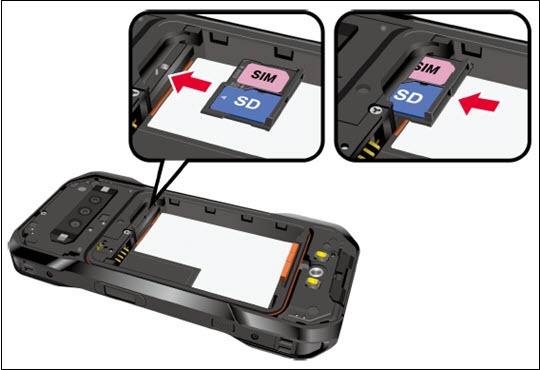
- Insert the tray into the SIM / microSD card slot. If inserting the SD / memory card, be careful not to let the card slide out. Then gently push the tray back into the slot until it fits into place.
- Place the battery back into its compartment, lock it in place by sliding the battery latch then replace the back cover. If necessary, refer to Insert / Remove Battery for assistance.