KYOCERA DuraForce PRO 3 Insert / Remove SIM Card
KYOCERA DuraForce PRO 3
Insert / Remove SIM CardSwitching to a new device, traveling or troubleshooting a connectivity issue? Learn how to quickly and easily insert or remove the SIM card for your DuraForce PRO 3.
Before your begin
Don't attempt to insert the SIM card while the device is powered on. Doing so may harm the SIM card and / or the device.
Steps
- Ensure the phone is powered off.
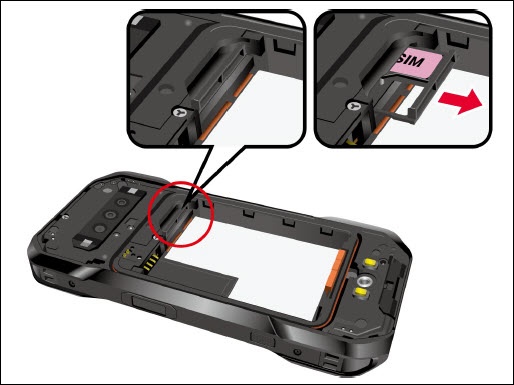
- Locate the SIM/microSD card slot inside the battery compartment and pull the card tray out of the slot.
- Do one of the following:
- Insert the SIM Card
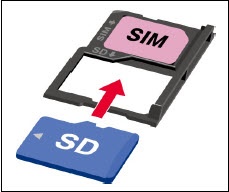
- Put the tray onto a flat surface and place a SIM card into the tray. Ensure the gold contacts are facing down as shown. Insert SIM card into tray with gold contacts facing down.
- Remove the SIM Card
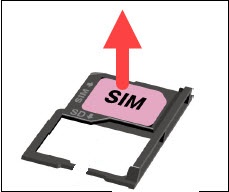
- To remove the SIM card, gently push up on the SIM card from underneath the tray.
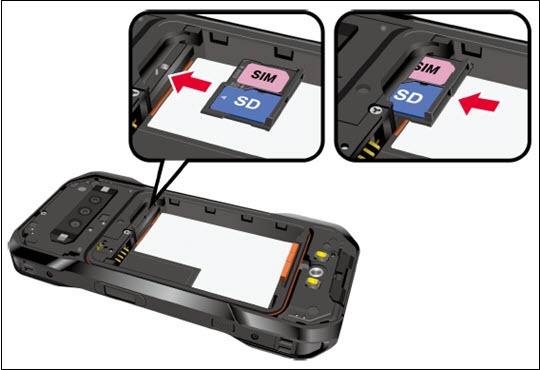
- Insert the tray into the SIM/microSD card slot. If inserting the SIM card, be careful not to let the cards slide out. Then gently push the tray back into the slot until it fits into place.
- Place the battery back into its compartment, lock it in place by sliding the battery latch and replace the back cover. If necessary, refer to Insert / Remove Battery for assistance.