Stream TV - LED Status Indicators
View this info for explanations of status LEDs on your 2nd-generation Stream TV.
- The steps below apply to the 2nd-generation Stream TV which can be identified by the Find My Remote button. If you have the original Stream TV model, refer to Stream TV - LED Status Indicators.
- An LED indicator is located on the front-left corner of the Stream TV.
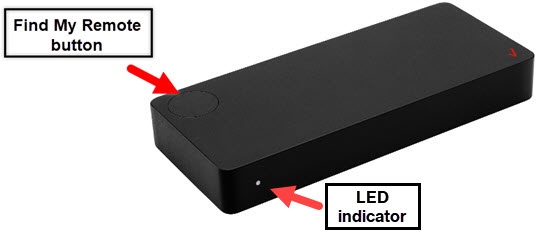
LED Indicator Guide
Device Status | Description | LED Status |
Booting Up | The Stream TV is powered on and in the process of booting up. | Soft Blink: White |
Not connected to display or remote | The Stream TV has no HDMI connectivity or is not paired to a remote control. | Solid: Red |
Pairing remote via Bluetooth | Until paired to remote or 1-2 minute time out. | Hard Blink: Blue |
No internet | The Stream TV is not connected to the internet | Solid: Yellow |
Device setup complete | All connections are complete. | Solid: White |
Device Standby | Low Power mode | Dim Solid: White |
FOTA Update | Firmware Over-the-air update in progress | Fast Blink: White |
WPS Pairing | The Stream TV is attempting to pair through WPS. | Hard Blink: Green |
Factory Reset | The Stream TV is being reset and booting up. | Blink: Yellow |
Error | Firmware or Hardware critical failure or overheating issue | Hard Blink: Red |