Samsung Galaxy Book Go 5G - Transfer Data via USB
Here's how to transfer data from your Galaxy Book Go 5G to a portable USB storage device.
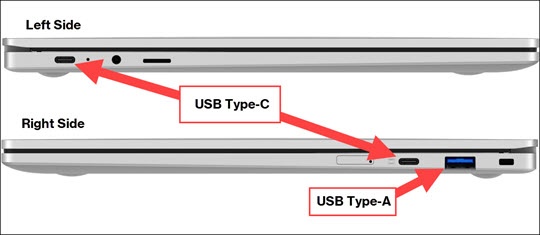
- Connect an external drive (e.g., Flash drive, etc.) to one of the laptop's USB ports.There are 2 USB Type-C ports and 1 USB Type-A port available on the sides of the laptop.If necessary, USB adapters can be purchased from any Verizon retail store or at the online store.
- Utilize File Explorer to transfer data between the external drive and the computer.If File Explorer doesn't launch automatically, press theWindows+E(
+E)
keys.For more info, refer to Microsoft's support article.