Verizon Orbic Speed - Activate / Set Up Replacement Device
Here's how to quickly set up your replacement Orbic Speed.
Follow these step-by-step instructions to activate your replacement Orbic® Speed™
- These instructions are to activate the Orbic Speed as a part of the Ellipsis Jetpack Mobile Hotspot Device Recall. If you are not a part of the recall, see this article instead.
- Activation instructions are also included with the Orbic Speed replacement device.
Postpaid activation and setup
- Insert the battery.Before using the device, ensure the battery is fully charged.
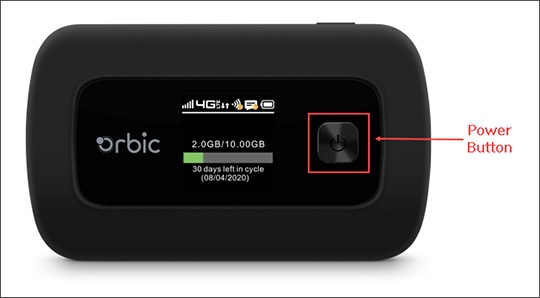
- Power the device on by holding thePower buttonfor two seconds.
- To activate service, connect a computer or smartphone, open an internet browser and follow the step-by-step instructions.You'll see the 4G LTE signal when the activation is finished.Additional computers and smartphones can now connect to the Orbic Speed via Wi-Fi.
- Review the quick start guide for Wi-Fi network name and password.
Prepaid activation and setup
- Call (866) 893-7723.
- Select option 5 for Ellipsis Jetpack replacement.
- Enter the 10-digit Jetpack phone number for the Ellipsis Jetpack that you were asked to make note of when you returned it.
- Wait for device change confirmation.
- Insert the battery.Before using the device, make sure the battery is fully charged.
- Power on your Orbic Speed by holding thePower buttonfor two seconds.
- To activate service, connect a computer or smartphone, open an internet browser and follow the step-by-step instructions.You'll see the 4G LTE signal on the device when the activation is finished.Additional computers and smartphones can now connect to the Orbic Speed via Wi-Fi.
- Review the quick start guide for Wi-Fi network name and password.