Fossil Gen 5 LTE Smartwatch - Create and Send a Text Message
Here's how to create and send a text message from your Fossil Gen 5 LTE Smartwatch.
Ensure the software on your Fossil Gen 5 LTE Smartwatch is up to date as the steps below apply to the most recent version.
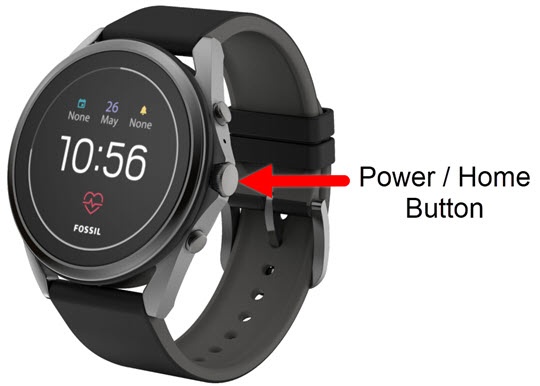
- From the watch screen, press thePower / Home buttonto open the apps screen.
- Tap theMessages icon
.
- TapNew message.
- Do one of the following:
- Tap theDialpad icon
enter the 10-digit number, then tap the
Enter icon.
- Select the desired contact.Multiple contacts can be selected, swipe up or down to scroll through the contacts list.
- Tap theDone icon
.
- Tap one of the following options:
- Speak your reply
:
- Speak your response.
- Wait for your response to be turned into text.
- TapDone iconto send.
- Reply with an Emoji
:
- Draw an emoji.
- Draw emoji with your finger.
- Tap theDone iconto send.
- Choose a pre-installed emoji
- Tap on theEmoji icon
- Scroll up or down then tap the desired emoji.
- Tap theDone iconto send.
- Write a text reply
:
- Use your fingertip to write out the message.
- Tap theSend icon
.
- Use a quick reply:
- Scroll up or down.
- Tap the desired reply (e.g., OK, Yes, No, etc.) to send.