Verizon Orbic Speed - Language Selection
Here's how to change the language used on your Orbic Speed.
Follow the steps below to change the language from English to Español or Español to English on your Verizon Orbic® Speed™.
English to Español
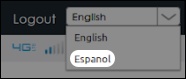
- Access the Admin Web Interface.
- From the top right, select 'Espanol' in the dropdown.
Español to English
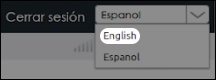
- Access the Admin Web Interface.
- From the top right, select 'English' in the dropdown.