Samsung Galaxy Watch3 - Turn Wi-Fi On / Off
Turn Wi-Fi on if you want to connect your Galaxy Watch3 to an available Wi-Fi network, or turn it off to troubleshoot or conserve battery life.
- Ensure your Galaxy Watch3 software is up to date as the steps below apply to the most recent version.
- Any apps or settings that are Wi-Fi reliant won't function while Wi-Fi is turned off.
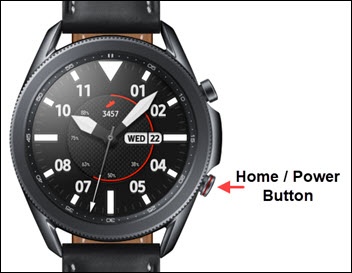
- From the watch screen, press theHome buttonto open the apps screen.
- Navigate: .
- TapWi-Fithen select one of the options (e.g. Auto, Always on, Always off).