Samsung Galaxy Watch3 - Turn Data On / Off
Turning data on your Galaxy Watch3 provides access to online services over the cellular network, while turning it off will impact that experience unless connected to Wi-Fi.
From your Android™ or Apple® iPhone®, ensure your Galaxy Watch3 software is up to date as the steps below apply to the most recent version.
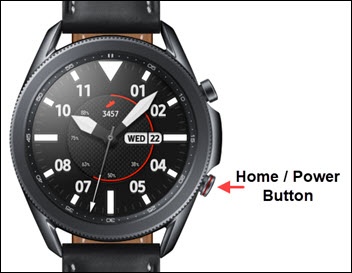
- From the watch screen, press theHome buttonto open the apps screen.
- Navigate:.SettingsConnections
- Do any of the following:
- Turn Data On / Off
- TapMobile networks.
- TapMobile datato turn on or off.Mobile network must be set to 'On' for this setting to be accessible.
- If prompted, review the 'Mobile data' message then tap theCheckmark iconto continue.
- Allow / Deny Data RoamingDepending on your plan, enabling data roaming may cause roaming charges (e.g., when traveling internationally).
- TapMobile networks.
- TapData roamingto turn on or off.
- If prompted, review the disclaimer then tap theCheckmark iconto confirm.