Samsung Galaxy Watch Active2 - Create and Send a Text Message
Here's how to create and send a text message from your Galaxy Watch Active2.
- Currently, the Galaxy Watch Active2 doesn't support replying to text with an Apple® iPhone®.
- From your Android™ smartphone, ensure your Galaxy Watch Active2 software is up to date as the steps below apply to the most recent version.
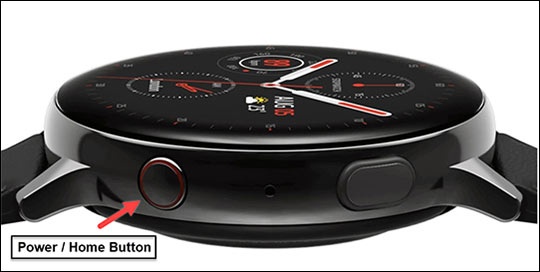
- From the watch screen, press theHome buttonto open the apps screen.
- Double-tap theMessages icon.
- Tap theContacts icon.
- Select the desired contact.Swipe up or down to scroll through the contacts list.
- Tap theNew Message icon.
- Do one of the following:
- Use Voice Service to create text:
- Tap theVoice icon.If necessary, review the Privacy Policy then tapAgree.
- If prompted, tap theCheckmark iconto allow Watch Input to access the microphone.
- Speak your message then tapSend.
- Send an Emoji:
- Tap theEmoji icon.
- Tap the desired emoji to send.
- Type a Message:
- Tap theText icon.
- In the 'Write text by hand' field, draw your message then tapSend.