Session status messages
Session Status

Due to inactivity, your session will end in approximately 2 minutes. Extend your session by clicking OK below.

Due to inactivity, your session has expired. Please sign in again to continue.

Samsung Galaxy Watch Active2 - View / Delete Call History

2026-10-15 11:13:17.898

Samsung Galaxy Watch Active2 - View / Delete Call History

Here's how to view and delete call history from your Galaxy Watch Active2.
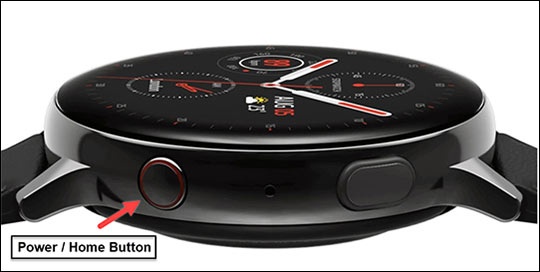
  1. From the watch screen, press the
    Home button
    to open the apps screen.
    Press and hold the Power button
  2. Double-tap the
    Phone icon
    Phone icon.
  3. Swipe up to view the call history.
  4. To clear calls from the history:
    1. Tap the
      Menu icon
      Menu icon.
    2. Select the desired call record.
    3. Tap
      Delete
      .