5G Home Router Locate Ports, Connectors and Buttons
5G Home Router
Locate Ports, Connectors and ButtonsReview this info for how to view the location of the various buttons, ports and connectors on your 5G Home Router.
Before you begin
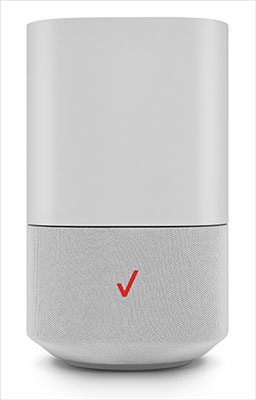
This content is for 5G Home Internet. Here's info on Fios Home Internet.
5G Home Internet service is currently offered in specific areas. Here's how to check for 5G coverage availability.
Top of Router
From the front of the router, view the touchpad, 4 buttons, and 4 microphones.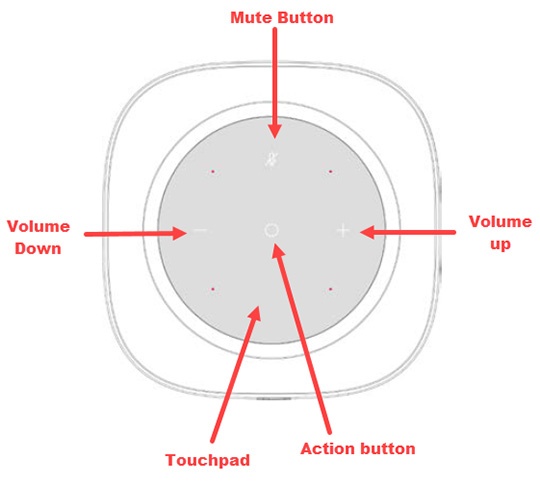
- Touchpad: A circular touchpad is located on the top panel of the K2 router. This is the main interface for setting up the Router. Remove the clear protective film from the top before use.
- Action Button: A touch-sensitive action button is located in the center of the touchpad on top of the Router. This button is used to turn off alerts, wake up Alexa®, interrupt an Alexa response, or rest the Alexa Voice Service (AVS). To reset AVS, press and hold down the button for 5 seconds.
- Volume Adjustment Buttons: Touch-sensitive volume adjustment buttons are located on the left and right sides of the touchpad on top of the Router. The Plus button+raises the volume, while the Minus button-lowers the volume.
- Mute Button: A touch-sensitive mute button is located near the upper edge of the touchpad above the action button.
- Microphones: Four microphones are located on the touchpad, arranged in a square pattern to determine the direction of the user's voice.
Back of Router
From the back of the router, view the available ports and buttons.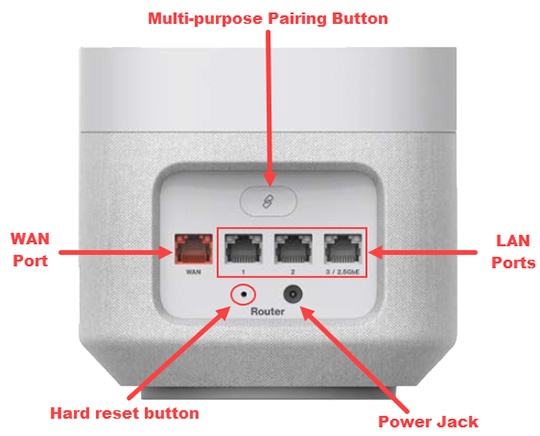
- WAN Port: The WAN Port (the red Ethernet port) connects the Router to a 5G CPE using an Ethernet cable.
- LAN Ports: Three LAN ports (one 2.5 Gbps port on the rightmost and two 1 Gbps ports in the middle) enable you to connect devices to the Router via Ethernet cables.
- Power Jack: Connect the AC adapter to the power jack to provide power to the Router from an electrical outlet.