5G Home Router Configure Broadcast Settings
5G Home Router
Configure Broadcast SettingsAdjust your Wi-Fi broadcast settings for your 5G Home Router to better manage your network visibility and improve overall security for your home devices.
Before you begin
This content is for 5G Home Internet. Here's info on Fios Home Internet.
5G Home Internet service is currently offered in specific areas. Here's how to check for 5G coverage availability.
You can also change the network name or password from your My Verizon app.
Steps
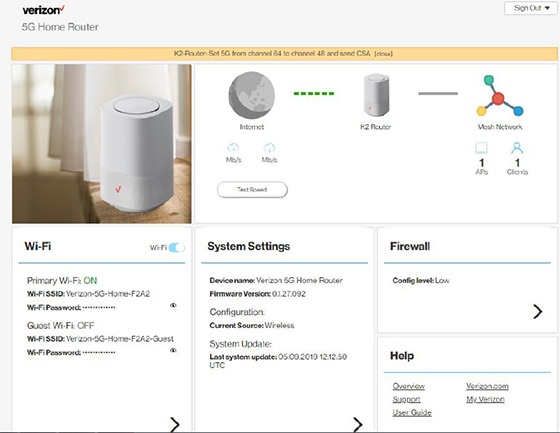
- Sign in to the Admin WebGUI.
- From the Router Home screen, clickWi-Fi.
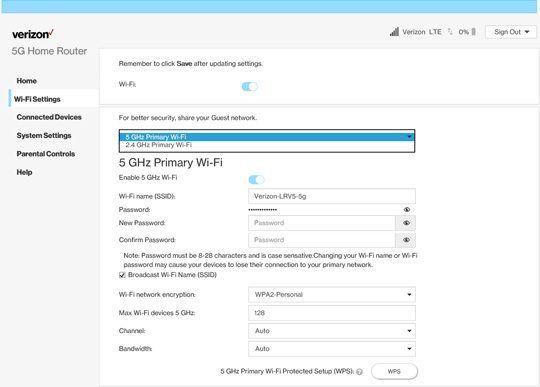
- From Wi-Fi Settings, click thePrimary Wi-Fi dropdown menuthen select one of the following to modify (channel options may vary based on the selected security type):
- 2.4GHz Primary Wi-Fi
- 5GHz Primary Wi-Fi
- From Wi-Fi Settings, view or click theDropdown menuto modify any of the following broadcast settings:Based on the Primary Wi-Fi option selected, channel options vary.Auto (default setting) is recommended.
- Channel (2.4GHz - Auto, 1-11)
- Channel (5GHz - Auto, 149, 153, 157, 161, 165)
- ClickSaveat the bottom of the screen.