KYOCERA DuraForce PRO 2 - Turn On / Off Camera Underwater Mode
Here's how to turn the underwater camera mode for your DuraForce PRO 2 on or off.
- When underwater mode is on, the touchscreen doesn't work.
- Use the keys on the top and sides of the phone to take photos and videos.
- Avoid putting the phone in saltwater.
- Always rinse the phone off in fresh water immediately after using it underwater.
- Don't use the phone in water more than 6.56 feet / 2 meters deep.
- Don't submerge the phone for more than 30 minutes.
- Don't drop the phone as that may allow water in to the phone.
Enable Underwater Mode
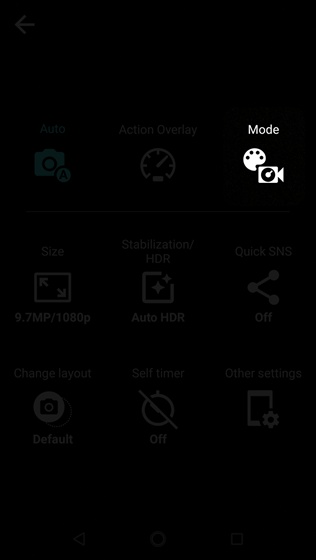
- From a Home screen, navigate:.AppsCamera
- TapMenu.
- TapMode.
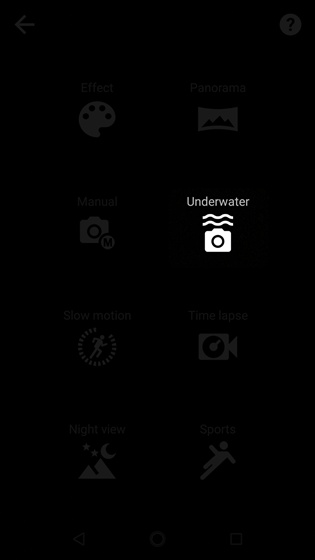
- TapUnderwater.


Disable Underwater Mode
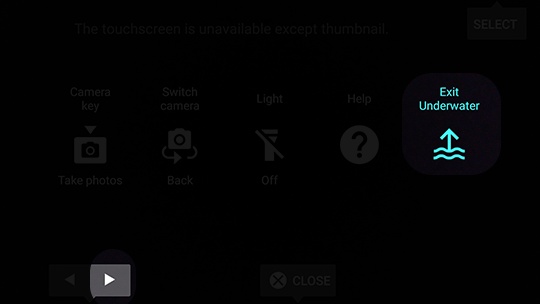
- Press theSpeaker buttonto select Menu (in landscape mode, on the bottom of the phone).
- Use theVolume Down button(in landscape mode, on the bottom left edge of the phone) to scroll over to highlight Exit Underwater.
- Press theCamera button(on the top right side of the phone) to choose SELECT.