Samsung Galaxy J3 V / Galaxy J3 (3rd Gen.) - Common Camera Settings
Here's info on common camera settings for your Galaxy J3 V / Galaxy J3.
For additional info on camera settings, refer to the user guide.
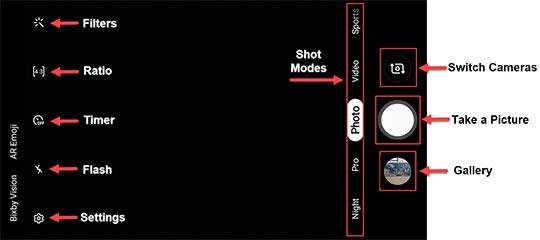
Shooting Modes
- From a Home screen, tap theCamera icon
(lower-right).
- Tap theShot Modes icon.
- Select an option:
- Photo
- Video
- Night
- HDR
- Pro
- Panorama
- Continuous shot
Filters
- From a Home screen, tap theCamera icon
- Tap theFilters icon.
- Select the desired filter (e.g., Autumn, Cream, Deep, etc.).
Ratio
- From a Home screen, tap theCamera icon
- Tap theRatio icon.
- Select the desired option:
- 3:4
- 9:16
- 1:1
Timer
- From a Home screen, tap theCamera icon
- Tap theTimer icon.
- Select the desired option:
- Off
- 2 secs
- 5 secs
- 10 secs
Flash
- From a Home screen, tap theCamera icon
- Tap theFlash icon.
- Select the desired option:
- Off
- Auto
- On
Gallery
- From a Home screen, tap theCamera icon
- Tap theGallery icon.
- Tap to access photos and videos in the gallery.
Switch Cameras
- From a Home screen, tap theCamera icon
- Tap theSwitch Cameras icon
to switch between rear and front-facing camera.
Resolution
- From a Home screen, tap theCamera icon
- Tap theSettings icon
.
- Tap Resolution then select the preferred option:
- Rear picture size:
- 1:1 (4.7 M)
- 1:1 (9.5 M)
- 16:9 (6.0 M)
- 16.9 (9.6 M)
- 4:3 (8.0 MP)
- 4:3 (13 MP)
- Rear Video video size:
- FHD (1920x1080)
- HD (1280x720)
- 1:1 (1072x1072)
- VGA (640x480)
- Front picture size:
- 1:1 (4.7 M)
- 1:1 (9.5 M)
- 16:9 (6.0 M)
- 16.9 (9.6 M)
- 4:3 (8.0 MP)
- 4:3 (13 MP)
- Front video size:
- FHD (1920x1080)
- HD (1280x720)
- 1:1 (1072x1072)
- VGA (640x480)
Shooting Methods
- From a Home screen, tap theCamera icon
- Tap theSettings icon.
- Tap any of the following to turn on
or off
:
- Floating Shutter button: Add an extra Shutter button you can move anywhere on the screen.
- Tap screen: Tap the screen to take selfies.
- Show palm: Show your palm to the camera to take a selfie.
- TapPress Volume Key tothen select one of the following:
- Take picture or record video
- Zoom
- System volume