Push to Talk Plus - Kyocera DuraXV LTE - App Settings
Here's how to change app settings on your DuraXV LTE.
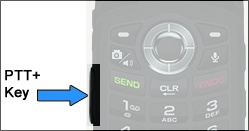
- Press thePTT+ key(located on the left side of the phone).
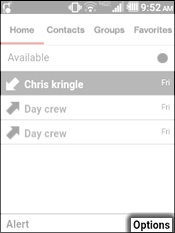
- From the Home tab, press theright soft keyto choose Options.
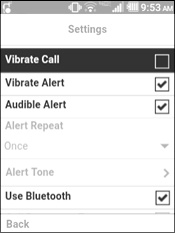
- SelectSettings.Utilize the 5-way navigation pad to highlight and the center button to select.
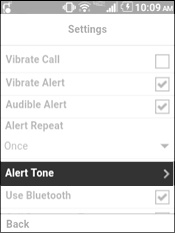
- Select any of the following to turn them on or off:Selected when a check mark is present.
- Vibreate Call
- Vibrate Alert
- Audible Alert
- Use Bluetooth
- Call Reconnect Tone
- Speaker
- Instant Personal Alert
- Missed Call Alert
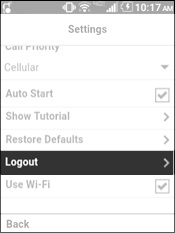
- Auto Start
- Use Wi-Fi
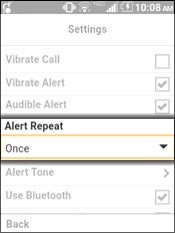
- Select the "Alert Repeat"dropdown menuthen select one of the following:
- Once
- RepeatAlert plays every 20 seconds for 10 minutes.
- ContinuousAlert plays every 20 seconds until it's cleared.This setting has a significant impact on battery life.
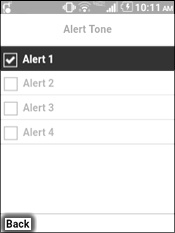
- SelectAlert Tone
- Select anAlert Tone(e.g., Alert 1, Alert 2, etc.) then press theleft soft keyto choose Back.Selected when a check mark is present.
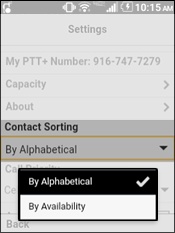
- Select the "Contact Sorting"dropdown menuthen select one of the following:Selected when a check mark is present.
- By Alphabetical
- By Availability
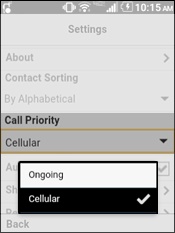
- Select the "Call Priority"dropdown menuthen select one of the following:Selected when a check mark is present.
- Ongoing
- Cellular
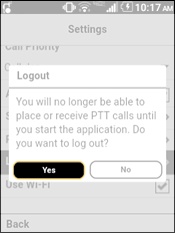
- To log out of PTT+:
- SelectLogout.
- SelectYes.