Samsung Galaxy J3 V / J3 (2016) - Common Camera Settings
Here's info on common camera settings (e.g., flash, timer, etc.), for your Galaxy J3 V / J3 (2016).
- For additional camera settings, refer to:
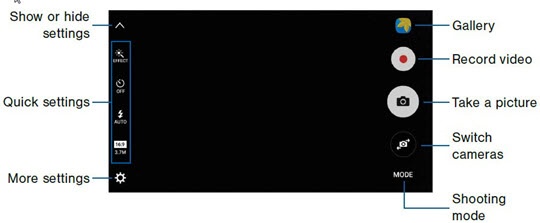
Settings
- From a Home screen, tap theCamera icon.
- Tap theMore settings icon.
- From the default screen, select an option then adjust as preferred:
- Picture Size
- Video Size
- Timer
- Focus mode
- Storage location, etc


Shooting Mode
- From a Home screen, tap theCamera icon.
- TapMode.
- Select an option:
- Auto
- Pro
- Panorama
- Continuous shot
- Beauty face
- Sports
- Sound and shot
Flash
- From a Home screen, tap theCamera icon.
- Tap theFlash iconto choose an option.
- Off
- Auto
- On
Timer
- From a Home screen, tap theCamera icon.
- Tap theTimer icon.
- Select an option:
- Off
- 2 secs
- 5 secs
- 10 secs

Record a Video
- From a Home screen, tap theCamera icon.
- Tap theRecord iconto record a video.

Shutter Icon
- From a Home screen, tap theCamera icon.
- Tap theShutter iconto take a picture.

Switch Camera
- From a Home screen, tap theCamera icon.
- Tap theSwitch Camera iconto switch between front and rear cameras.
