Check for Water Damage - Samsung
Here's how to help determine if your Samsung device has liquid damage.
Use the provided info below to help determine if your device has water damage.
- Prepaid service customers: Visit a Verizon store to order warranty replacements. Orders for prepaid warranty issues can't be processed via Customer Service.
- Standard service customers: If you need to replace your device under warranty and the device is water damaged, broken, or has unreasonable wear and tear, you could be assessed a Damaged Device Fee. If damage is found:
- Several replacement options may be available.
- If you have a LifeProof case, visit this support page.
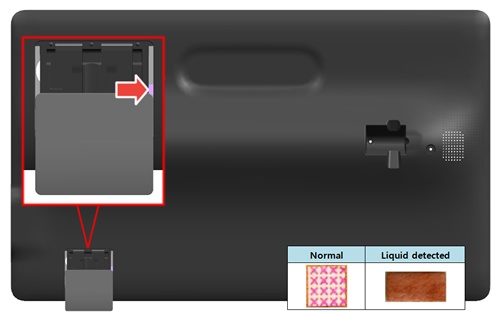
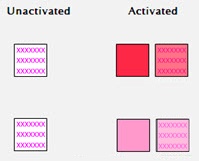
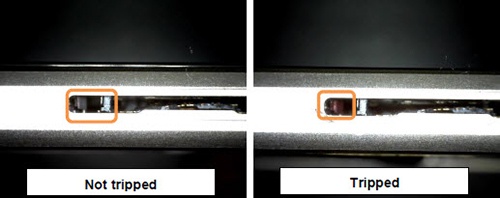
Samsung uses a white field with pink or red "X" marks to indicate a device that has had no liquid contact. When the indicator comes in contact with liquid, the "X" marks become pink or red smudge marks across the white field.
Removable Battery
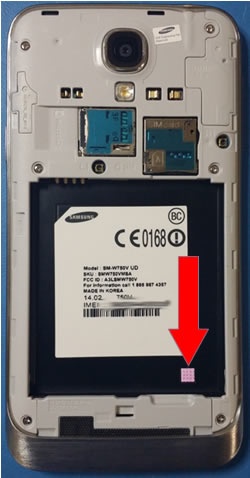
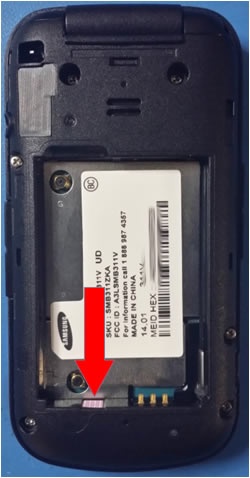
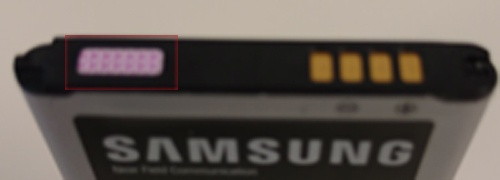
The indicator is located underneath the battery either on the side or the face of the battery tray. Some devices may have an additional LDI on the actual battery (located next to the gold contacts.)
Non-Removable Battery
Galaxy S6
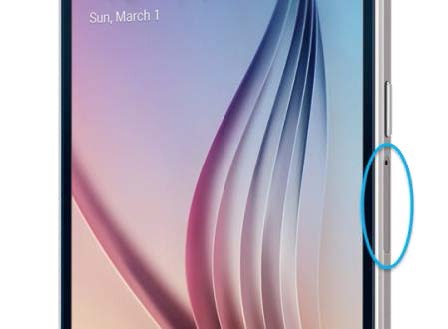
The SIM tray is located just below the Power Key on the right side of the phone.The Liquid Damage Indicator (LDI) is located inside the SIM tray slot, in the left corner of the frame, visible only when the SIM tray is removed. To view, hold the device with the display facing up, power key toward the user.
Galaxy S6 edge, S6 edge Plus & Galaxy Note5
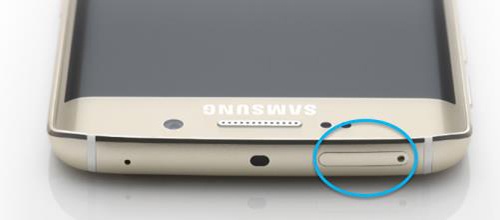
The SIM tray is located on the top of the phone, on the left side. The Liquid Damage Indicator (LDI) is located inside the SIM tray slot, below the SIM frame, and is visible when the tray is removed from the device.
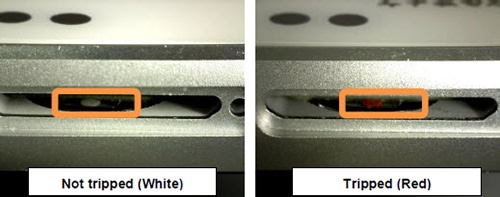
Galaxy View
The microSD/SIM card door is located on the back of the device and in the lower-left (ensure that the top of the stand is rotated forward).The Liquid Damage Indicator (LDI) is located to the right of the microSD card slot.