Insert / Remove SIM Card - LG G Pad 8.3 LTE
Here's how to properly insert or remove a SIM card for your LG G Pad 8.3 LTE.
Instructions on inserting / removing your SIM can help with activation issues / errors, browser connection problems and a blank or frozen screen.
- Don't attempt to insert/remove the SIM card while the device is powered on. Doing so may harm the SIM card and/or the device.
- Don't modify or alter your SIM card.
- Ensure the device is powered off.
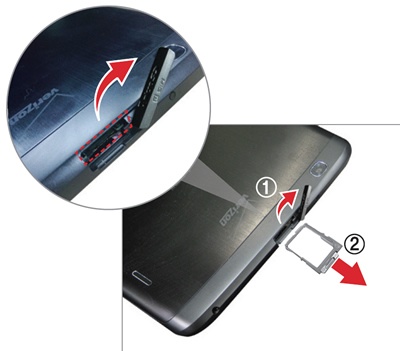
- From the top edge of the device (display facing up), open the cover then remove the card tray.Utilizing the notch, rotate the cover up (figure 1) then remove the tray (figure 2).
- Do one of the following:
- Insert SIM cardEnsure the gold contacts are facing the screen and the notch is located in the upper-right.
- Remove SIM cardOnce the tray is removed, lift the SIM card from the tray.
- Insert the SIM tray.Press in on the tray to lock it into place then close the cover.